MECH AI: Diagnostic & Repair
- 4.2
- Rating
- 100.00K
- Installs
- Free
- Price

 Analysis by App-foxy
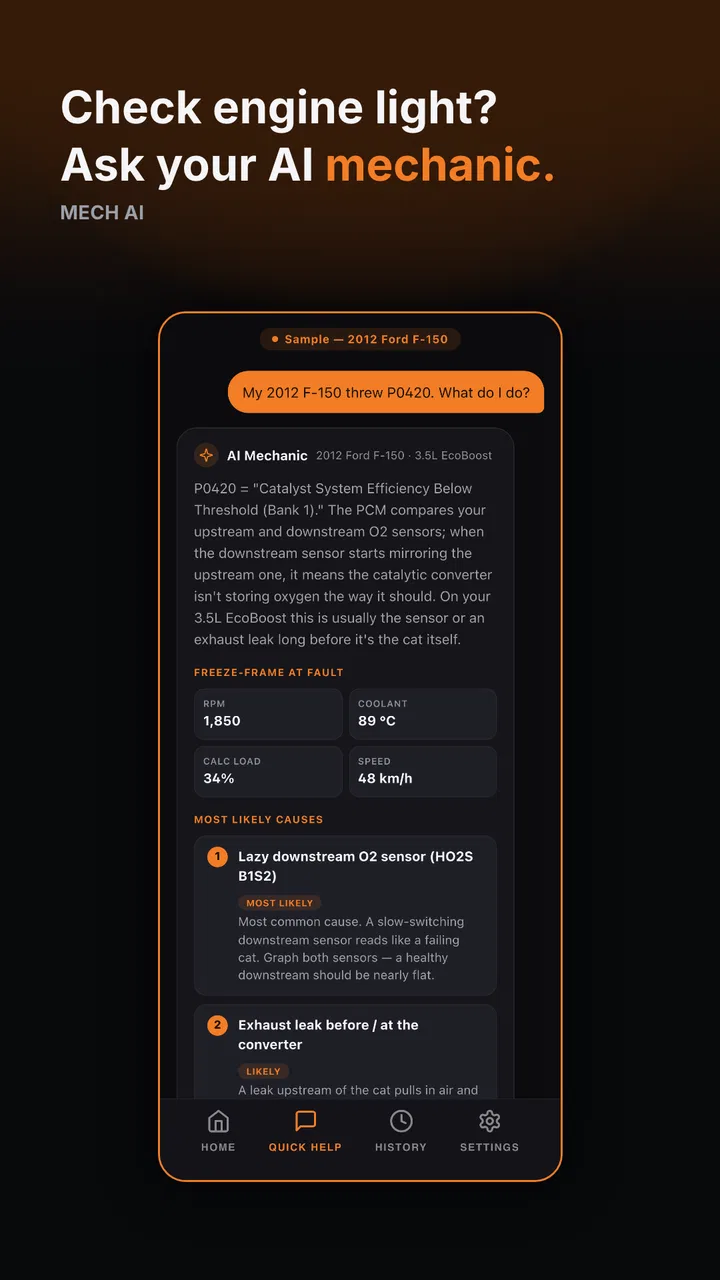
When a warning light appears in a shared household car, the first problem is often not the repair itself but the confusion that follows: who noticed it, what happened before it appeared, and whether the vehicle is safe to drive. I found MECH AI: Diagnostic & Repair useful in that exact situation. It is an automotive assistant from MECH.AI LLC that uses AI to help interpret vehicle problems and guide the next step. I would not treat it as a replacement for a trained mechanic, but I do see value in having a calm starting point before calling a workshop or deciding whether a trip should be postponed.
The app is free to install, which makes it easy to try without committing money at the beginning. Its overall rating sits at a 4.3 average from roughly six hundred ratings, and it has passed the hundred-thousand-install mark. Those figures suggest that it has found a real audience, although they should not be mistaken for proof that every diagnosis will be correct. Car faults are highly dependent on the vehicle, symptoms, maintenance history, and the quality of the information entered.
How MECH AI fits into a shared household car
I think the most practical way to use this app is as a shared reference point rather than as a private mechanic living on one person’s phone. Imagine a family car used by two adults and an older teenager. One driver notices a rough idle on the way home, another sees a dashboard warning the next morning, and a third person needs the car for work. Instead of each person searching separately and passing along half-remembered advice, the household can use the same assistant to organize the symptoms and decide what deserves attention first.
You May Also Like

 Google Keep - Notes and lists
Google Keep’s Quiet Growth Shows the Appeal of Simpler Notes
As mobile work gets busier, Google Keep keeps winning a simple contest: capture a thought quickly, find it later, and get on with the day.

 Blood Strike: 2.5 Anniversary
Blood Strike’s Loadouts Turn Every Drop Into a Tactical Gamble
A close look at Blood Strike’s custom loadouts: how fast access to signature weapons reshapes its battle royale rhythm, rewards preparation, and narrows the gap between fights.

 Pandora - Music & Podcasts
Pandora’s Music Is Easy to Start, but Harder to Recover
Pandora’s strength is its low-effort path from a seed to a station. Its weak spot is how much confidence it asks you to place in connection, setup, and quiet recovery.

 8 Ball Pool
 Is Built on Rivalries, Rematches, and Routine
A close look at the rivalries, rematches, shared routines, and unanswered safety questions that turn a quick pool match into a persistent mobile community.

 Samsung Music
’s Quiet Strength Is Playing What You Already Own
Its reach comes less from spectacle than from dependable access to a personal library. That simplicity is both the app’s strongest retention engine and its ceiling.

 AccuWeather: Weather Radar
AccuWeather Review: A Quick, Clear Forecast for Everyday Decisions
For everyday plans, the best forecast is the one you can understand quickly. AccuWeather makes rain timing, radar, and local conditions easy to act on, with a few trade-offs.
More From Our News Desk



That does not mean everyone should accept an AI answer without discussion. The useful part is the conversation it starts. A driver can describe when the problem occurs, whether it appears during acceleration or braking, and whether any unusual sound or smell is present. Another household member can add recent maintenance details. This produces a more complete picture than a vague message such as “the car feels strange,” and it gives a mechanic better information if professional help becomes necessary.
In my experience, the app is most helpful during the uncertain middle stage between noticing a symptom and getting a proper inspection. It can help a new driver learn the difference between a minor inconvenience and a situation that deserves prompt attention. It can also help an experienced owner prepare questions instead of arriving at a garage with no description beyond a dashboard symbol.
The key household rule is simple: use the app to improve communication, not to assign blame or approve risky driving. If one person enters incomplete information, the resulting guidance may be incomplete too. A shared vehicle makes this especially important because the person reporting the issue may not be the person who last drove it.
What the first use feels like
The app’s appeal is its direct focus. Rather than presenting itself as a general travel tool or a broad vehicle marketplace, it is built around automotive diagnosis and repair guidance. That focus makes sense when you already have a symptom in mind. You are not opening it to plan a route or compare fuel prices; you are opening it because something about the car needs explaining.
I would begin with the vehicle details and the symptom description, then read the response slowly instead of jumping to the first suggested fix. The quality of an AI assistant depends heavily on the question it receives. “Engine problem” is too broad to be useful. A better description includes when the issue began, what conditions trigger it, whether the car starts normally, and whether the same symptom has appeared before.
One non-obvious benefit is that writing the problem down can reveal missing information. While describing a vibration, you may realize that it only happens above a certain speed, only while braking, or only after the car has warmed up. Those distinctions matter. Even if the app does not identify the final cause, it can help turn an impression into a testable description.
Setting boundaries before several people use it
MECH AI is suitable for a shared-device conversation, but I would not assume that a household account automatically separates one person’s vehicle history, questions, or decisions from another person’s. If several people use one phone or one account, agree on a simple routine: identify the vehicle at the beginning of a question, include the date of the observation in ordinary language, and say who noticed the symptom.
This is not busywork. A household may have a small car, a van, and an older vehicle used only occasionally. Mixing their symptoms can lead to misleading follow-up questions and wasted time. If the app presents a previous conversation or answer, check that it concerns the same vehicle before relying on it. I would also avoid treating an old answer as a permanent maintenance record unless the household separately keeps those details in a trusted place.
Another useful boundary is deciding who can approve spending. The app may suggest possible causes or repair directions, but that does not make it an authority for purchasing parts. In a shared home, the person who asks the question should report the result to the person responsible for maintenance before ordering anything. This is particularly important when a suggested repair involves safety systems, fluids, electrical work, or components that require specialist tools.
The free entry point is convenient, but the app includes in-app purchases ranging from $0.99 to $749.99 per item. That is a wide range, so I would check the purchase screen carefully before confirming anything. On a shared device, this matters even more: the person exploring a diagnostic answer may not be the person who manages the household budget. Keep purchasing decisions separate from casual testing, and do not assume that a free download means every useful function is free.
Coordinating a real problem from first symptom to workshop
A good workflow is to create a short incident report in the conversation itself. Start with the vehicle, the exact symptom, and the conditions under which it appears. Add whether warning lights are present, whether the car remains drivable, and whether anything changed recently, such as a service visit, battery replacement, tire work, or a long period without use. Then ask the app to separate possible explanations from checks that can be performed safely.
This approach gives the assistant a better chance of producing useful guidance, but it also protects the household from a common mistake: confusing a possible cause with a confirmed diagnosis. I would copy the important observations into a note shared with the other drivers, not just forward a conclusion. The observations are usually more valuable than the prediction because a mechanic can verify them.
For example, if a driver reports a noise, the next person should not merely repeat “the app says it is the belt.” They should record whether the noise changes with engine speed, whether it is present when the car is stationary, and whether it appears during turns. That kind of follow-up can narrow the conversation without pretending that a phone-based assistant has physically inspected the vehicle.
MECH AI can also help coordinate the call to a repair shop. Before contacting a mechanic, I would use it to turn scattered observations into a concise list: what happened, when it happens, what the driver already checked, and whether the problem is getting worse. This saves time and reduces the chance that a family member forgets an important detail under pressure.
There is a trade-off here. AI guidance is faster and often easier to understand than searching through unrelated forum posts, but a forum may contain long-term owner experiences for a particular model. A repair manual is more authoritative for procedures and specifications. A professional inspection is stronger when the problem involves safety, intermittent faults, or symptoms that cannot be reproduced reliably. The app works best between those options, helping you frame the issue rather than replacing them.
Age, trust, and responsible use
The app carries an Everyone content rating, so its subject matter is broadly suitable for general audiences. That does not mean every repair instruction is appropriate for every age group. A younger household member can use it to learn vocabulary, record symptoms, and understand why a warning light matters. I would not let a child work alone around a running engine, hot components, moving parts, fuel, or electrical systems simply because an app described a check.
For teenagers who drive, the app may encourage better reporting. Instead of hiding a warning light because they fear getting in trouble, they can describe what happened and start a practical conversation. The adult’s role is still essential: verify the symptom, decide whether the car should be driven, and arrange inspection when needed. Trust grows when the app is presented as a tool for honest reporting rather than as a way to prove that someone caused damage.
I also recommend explaining uncertainty openly. If the assistant gives several possible causes, that is not a failure; automotive symptoms often overlap. A rattling sound, for instance, can have very different explanations depending on where it comes from and when it occurs. Household members should learn to distinguish “this is one possibility” from “this has been diagnosed.” That distinction is more important than getting an impressive-sounding answer quickly.
Privacy is another practical consideration for shared use. Before entering information, think about whether the question includes personal details that do not help diagnose the vehicle. Keep the description focused on the car, the symptom, and relevant maintenance history. If several people use the same device, remember that a conversation may be visible to the next person using it. That is a reason to maintain clear boundaries, not a reason to avoid the app entirely.
Where the app is genuinely useful
One strong use case is preparation for a repair appointment. Many drivers struggle to describe a problem because they do not know the correct mechanical terms. The app can help translate everyday observations into questions a workshop can understand. You can arrive prepared to ask whether the symptom points toward a particular system, what tests should confirm it, and whether continued driving is sensible.
A second use case is deciding what information to collect before escalating. If the car starts but behaves differently only under certain conditions, the app can prompt you to notice those conditions. That is more useful than randomly replacing parts. The hidden advantage is not necessarily a perfect answer; it is the structure it gives to observation.
A third use case is helping a household compare urgency. A cosmetic issue, a maintenance reminder, and a symptom that affects steering or braking should not receive the same response. I would use the app to organize questions, then apply common-sense caution. If the vehicle feels unsafe, stop using it and seek qualified assistance rather than waiting for an AI explanation.
The app may also suit people who feel intimidated by automotive language. Its conversational format can make it easier to ask basic questions without worrying that they sound uninformed. That matters in a household where one person usually handles the car and another wants to participate. Shared understanding can prevent missed maintenance and reduce dependence on a single driver’s memory.
Limitations that change my recommendation
The biggest limitation is physical access. An AI assistant cannot hear the exact noise in your driveway, measure a voltage, inspect a fluid, lift the vehicle, or confirm that a component is damaged. Even a detailed response remains guidance until someone verifies it. I would be especially cautious with symptoms involving brakes, steering, tires, overheating, fuel leaks, airbags, or loss of power while driving.
Another limitation is that a confident explanation can feel more certain than it deserves. When using the app, read for conditions and verification steps, not just the named fault. If the response suggests a check, ask whether it is safe for your skill level and equipment. If the answer recommends a repair but does not explain how to confirm the cause, take that as a signal to consult a mechanic rather than buying parts immediately.
The app is also not the right choice for someone who wants a complete workshop manual, model-specific torque specifications, or a guaranteed repair sequence. A manufacturer service resource or qualified technician is better for those needs. Likewise, if you already have a reliable mechanic and a well-organized maintenance record, MECH AI may add less value unless you want help describing a new symptom.
Version 1.1.9 is the current version, and the app supports devices running Android 7.0 or later. That makes it accessible on many older Android phones, which is helpful for a shared household device kept in the garage or glove compartment. Still, an older phone may be slower or less comfortable for lengthy conversations, so I would use a device that can display the guidance clearly and remain available when the car is parked safely.
My household verdict
After using MECH AI: Diagnostic & Repair as an automotive question-and-coordination tool, I would recommend it to households that want help turning vague car symptoms into organized next steps. It is particularly appealing when several people drive the same vehicle, when a newer driver needs a less intimidating way to report a problem, or when you want to prepare for a mechanic visit without searching through disconnected pages.
I would not recommend making it the household’s final authority. The best results come from combining a careful description, shared notes, sensible safety limits, and professional inspection when the issue is serious or unclear. If you remember only one workflow, use this one: identify the vehicle, describe the symptom precisely, ask what would verify the possibilities, record the observations, and let a qualified person handle work that carries real risk.
MECH.AI LLC has made a focused tool rather than a general car ownership hub, and that focus is its main strength. The free starting point lowers the barrier to trying it, while the purchase options mean shared-device users should pay attention before confirming an upgrade or other transaction. For everyday household coordination, I find the app worthwhile as a first conversation. For safety-critical diagnosis, complex repairs, or final decisions about driving, I would always place a trained mechanic and direct inspection above the screen.
That balance is why I would keep it available on a family phone but set expectations clearly. MECH AI is most valuable when it helps people ask better questions and share better information. Used that way, it can reduce confusion, support more honest reporting from every driver, and make the next call to a repair professional more productive without pretending that artificial intelligence can replace hands-on automotive expertise.
FAQs for MECH AI: Diagnostic & Repair
01What is MECH AI: Diagnostic & Repair and how does it work?
MECH AI: Diagnostic & Repair is an advanced application designed to assist users in diagnosing and repairing mechanical issues in vehicles. Utilizing artificial intelligence, the app analyzes symptoms and provides step-by-step repair guides. Users input vehicle details and symptoms, and the app generates potential causes and solutions, simplifying the troubleshooting process.
02Is MECH AI compatible with all types of vehicles?
MECH AI is compatible with a wide range of vehicles, including cars, trucks, and motorcycles. However, the app's effectiveness may vary depending on the make, model, and year of the vehicle. It's important to check the app's compatibility list or contact support to ensure it supports your specific vehicle type before downloading.
03Do I need any special tools or equipment to use MECH AI effectively?
While MECH AI provides diagnostic information and repair guides, some repairs may require specific tools or mechanical skills. The app helps identify these needs by listing required tools alongside the repair instructions. Users should be prepared to obtain or access these tools to fully utilize the app’s capabilities.
04Is there a subscription fee or one-time purchase cost for MECH AI?
MECH AI offers both a free version with limited features and a premium subscription that unlocks the full suite of tools and guides. The subscription model provides regular updates, additional diagnostic capabilities, and comprehensive repair guides. Pricing details are available within the app or on the official website.
05How user-friendly is MECH AI for someone without mechanical experience?
MECH AI is designed to be user-friendly, making it accessible even for individuals with minimal mechanical experience. The app provides clear, concise instructions and visual aids to guide users through diagnostics and repairs. For those unfamiliar with vehicle mechanics, the app also offers helpful tips and support to ease the learning curve.
Pros
- User-friendly interface simplifies diagnostics.
- Comprehensive database covers numerous car models.
- Real-time updates keep information current.
- Offline mode available for remote locations.
- Detailed tutorials enhance user understanding.
Cons
- Limited free features
- subscription required.
- Not compatible with older smartphone models.
- Occasional bugs in the diagnostic process.
- Requires stable internet for optimal use.
- Customer support response can be slow.

MECH AI: Diagnostic & Repair
Gallery